Elasticsearch Refresh vs Flush: What Each One Does and When It Runs
A detailed look at the difference between refresh and flush in Elasticsearch, including when each one is triggered, the scope it covers, and how each affects search visibility.
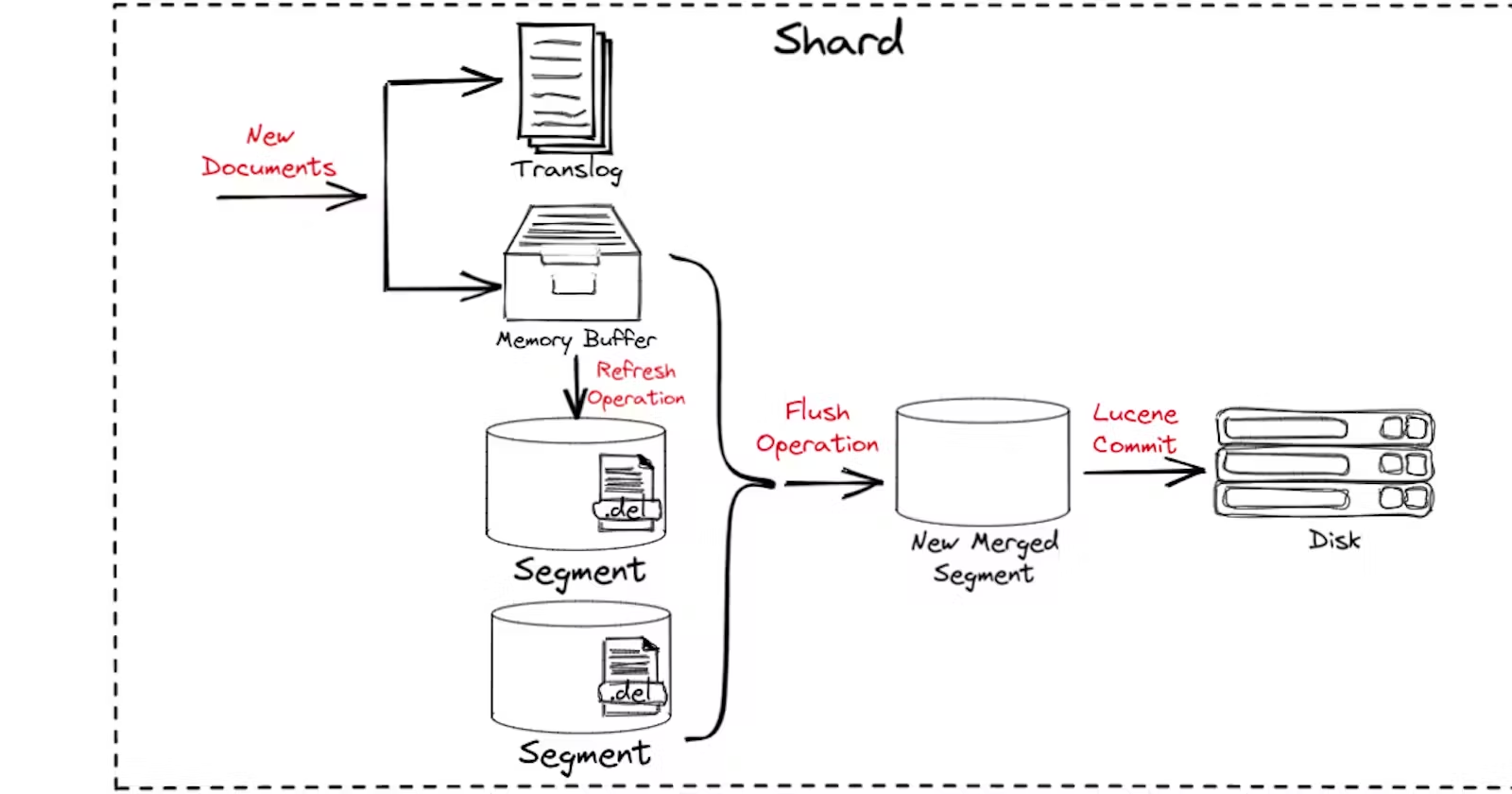
Image from https://lakshyabansal.hashnode.dev/write-operation-in-elasticsearch
Refresh
Use the refresh API to explicitly refresh one or more indices. If the request targets a data stream, the background indices of that stream are refreshed. A refresh makes every operation performed on an index since the last refresh available for searching.
By default, Elasticsearch periodically refreshes indices every second, but only indices that have received a search request within the last 30 seconds. You can change this default interval with index.refresh_interval.
Refresh requests are synchronous, and the response is not returned until the refresh operation completes.
Example
Set an index’s refresh_interval to -1 and /_search?track_total_hits=true will return an inaccurate total hit count — for instance, data keeps being written while the total returned by the query stays the same.
Flush
For a data stream or an index, a flush persists data that currently lives only in the transaction log (translog) into the Lucene index. When Elasticsearch restarts, it replays the data in the transaction log that has not been flushed to the Lucene index, restoring Elasticsearch to its pre-restart state.
By default, Elasticsearch uses memory heuristics so that flushes are triggered automatically as needed in order to free memory.
Elasticsearch automatically triggers flushes as needed, using heuristics that trade off the size of the unflushed transaction log against the cost of performing each flush.
Once an operation has been flushed, it is permanently stored in the Lucene index. That means no extra copy of it needs to be maintained in the transaction log, unless it is retained for some other reason. The transaction log consists of multiple files called generations; once a generation file is no longer needed, Elasticsearch deletes it, freeing disk space.
You can also trigger a flush on one or more indices with the flush API, although it is rarely necessary to call this API directly. If you call the flush API after indexing some documents, a successful response indicates that Elasticsearch has flushed all documents indexed before the flush API call.
Elasticsearch flushes the translog automatically in the background. By default, Elasticsearch checks every 5 seconds whether it should flush the translog. The default conditions are a proactive flush every 30 minutes, or when the translog file grows larger than 512 MB. With the default configuration, every completed index, bulk, delete or update triggers a flush of the translog to disk before the 200 OK is returned. This improves data safety, but it takes a real toll on write performance.
When write throughput matters more, set the following parameters in the index template:
1 | "index.translog.durability":"async"(default is request) |
Summary
In short, _refresh is what makes new documents visible to searches.
Conversely, _flush is what persists in-memory segments to disk._flush does not affect document visibility in Elasticsearch, because searches run against the in-memory segments; _refresh is what affects that visibility.
This article is the English edition of a post originally published in Chinese.