Elasticsearch Cluster Lost Its Master: Thread Pools, Packet Capture, and 60,000 Shards
Notes on an Elasticsearch cluster incident:
the analysis, the troubleshooting, and the recovery.
🕰️ Version note: This post was written in 2023, against a cluster from the Elasticsearch 7.x era. The technology moves fast — read it alongside the version you actually run.
Background
The cluster in this incident ran on seven machines:
- 127.0.204.193
- 127.0.204.194
- 127.0.204.195
- 127.0.220.73
- 127.0.220.74
- 127.0.220.220
- 127.0.220.221
Machines 193, 194 and 195 had identical specs:
- CPU: 32 cores
- Memory: 128 GB
- Disk: 4T × 3
The system disk is mounted separately: 40 GB
Machines 73, 74, 220 and 221 also had identical specs:
- CPU: 32 cores
- Memory: 128 GB
- Disk: 10T
The system disk is mounted separately: 50 GB
All seven machines use Alibaba Cloud Premium Cloud Disk (高效云盘), see https://help.aliyun.com/zh/ecs/user-guide/disks-2
That means the maximum throughput (read + write combined) is capped at 140 MB/s.
The problem
Because the budget was tight, the deployment was complicated: these seven machines hosted one Kafka cluster, one ZooKeeper cluster, and two Elasticsearch clusters.
- Kafka and ZooKeeper were deployed on 193, 194 and 195;
- Each of the two Elasticsearch clusters had 7 nodes — so every one of the seven machines held an instance of both Elasticsearch clusters;
- The three disks on 193/194/195 were shared by Kafka, ZooKeeper, and both Elasticsearch clusters.
Before this incident, we had already seen Kafka write latency spike once. Analysis showed that the two Elasticsearch clusters and the Kafka cluster sharing a disk saturated the disk I/O, which caused the Kafka lag.
So the three disks on 193/194/195 were reorganized as follows:
- One 4T disk dedicated to Kafka and ZooKeeper
- The remaining two 4T disks shared by the two Elasticsearch clusters (one of those clusters holds very little data — under 10 GB — so it can be ignored)
Background covered. Now the problem in this incident:
- At 5 p.m. on the 23rd, the Elasticsearch cluster went down
- The cluster had no master
- At 9 a.m. on the 25th, the Elasticsearch cluster started rebalancing shards again
Analysis
Because the failure on the 23rd was urgent, the plan at the time was simply to restart the whole cluster and get back up first.
The “no master” error in the logs on 193 at the time:
1 | {"type": "server", "timestamp": "2023-10-23T09:22:08,955Z", "level": "WARN", "component": "o.e.c.c.ClusterFormationFailureHelper", "cluster.name": "business-log", "node.name": "es-b-193", "message": "master not discovered or elected yet, an election requires at least 4 nodes with ids from [hYrrmhLHTx-QHoDmZ2wATg, jaNLhd1eT6SUYcLJkHpE1Q, 1VQFmt9jQ-6d7fCMjP-vnQ, uzGdH3VeRbOlcDIWeKdgIw, PhjlCea6TNKh4rdZPyPDkA, ZFQdNP4HSgCtPCnMfDdopw, 1WRaRyU-SuCPn8qbz3e4hg], have discovered [{es-b-193}{ZFQdNP4HSgCtPCnMfDdopw}{k0x5Rog-S0CFhAmorJ3V0Q}{127.0.204.193}{127.0.204.193:9301}{cdfhilmrstw}, {es-b-221}{jaNLhd1eT6SUYcLJkHpE1Q}{XkD-b14XQzq1-o3EiDSuKA}{127.0.220.221}{127.0.220.221:9301}{cdfhilmrstw}, {es-b-194}{PhjlCea6TNKh4rdZPyPDkA}{6pQJDRevScad3hr_hJcnTg}{127.0.204.194}{127.0.204.194:9301}{cdfhilmrstw}, {es-b-220}{hYrrmhLHTx-QHoDmZ2wATg}{Qyz9MF2bRmKQq9uPWgTBuw}{127.0.220.220}{127.0.220.220:9301}{cdfhilmrstw}, {es-b-195}{1VQFmt9jQ-6d7fCMjP-vnQ}{e_P2NNXnTIWGzg7vE8EWkA}{127.0.204.195}{127.0.204.195:9301}{cdfhilmrstw}, {es-b-74}{uzGdH3VeRbOlcDIWeKdgIw}{fhNTddq7Syi7zPDVCejDWQ}{127.0.220.74}{127.0.220.74:9301}{cdfhilmrstw}, {es-b-73}{1WRaRyU-SuCPn8qbz3e4hg}{1iRrVMWcSNGGxsuQYxePSg}{127.0.220.73}{127.0.220.73:9301}{cdfhilmrstw}] which is a quorum; discovery will continue using [127.0.204.194:9301, 127.0.204.195:9301] from hosts providers and [{es-b-220}{hYrrmhLHTx-QHoDmZ2wATg}{Qyz9MF2bRmKQq9uPWgTBuw}{127.0.220.220}{127.0.220.220:9301}{cdfhilmrstw}, {es-b-73}{1WRaRyU-SuCPn8qbz3e4hg}{1iRrVMWcSNGGxsuQYxePSg}{127.0.220.73}{127.0.220.73:9301}{cdfhilmrstw}, {es-b-193}{ZFQdNP4HSgCtPCnMfDdopw}{k0x5Rog-S0CFhAmorJ3V0Q}{127.0.204.193}{127.0.204.193:9301}{cdfhilmrstw}, {es-b-74}{uzGdH3VeRbOlcDIWeKdgIw}{fhNTddq7Syi7zPDVCejDWQ}{127.0.220.74}{127.0.220.74:9301}{cdfhilmrstw}, {es-b-194}{PhjlCea6TNKh4rdZPyPDkA}{6pQJDRevScad3hr_hJcnTg}{127.0.204.194}{127.0.204.194:9301}{cdfhilmrstw}, {es-b-221}{jaNLhd1eT6SUYcLJkHpE1Q}{XkD-b14XQzq1-o3EiDSuKA}{127.0.220.221}{127.0.220.221:9301}{cdfhilmrstw}, {es-b-195}{1VQFmt9jQ-6d7fCMjP-vnQ}{e_P2NNXnTIWGzg7vE8EWkA}{127.0.204.195}{127.0.204.195:9301}{cdfhilmrstw}] from last-known cluster state; node term 43, last-accepted version 397615 in term 43", "cluster.uuid": "ArYy-qmCTbCQTDUI8ogsBg", "node.id": "ZFQdNP4HSgCtPCnMfDdopw" } |
After recovery, going through the logs, the main thing we saw was node 193 being repeatedly added and removed:
1 | added {{es-b-193}{ZFQdNP4HSgCtPCnMfDdopw}{k0x5Rog-S0CFhAmorJ3V0Q}{127.0.204.193}{127.0.204.193:9301}{cdfhilmrstw}}, term: 43, version: 397620, reason: ApplyCommitRequest{term=43, version=397620, sourceNode={es-b-73}{1WRaRyU-SuCPn8qbz3e4hg}{1iRrVMWcSNGGxsuQYxePSg}{127.0.220.73}{127.0.220.73:9301}{cdfhilmrstw}{ml.machine_memory=133070966784, ml.max_open_jobs=512, xpack.installed=true, ml.max_jvm_size=33285996544, transform.node=true}} |
This kept the shards on 193 rebalancing continuously. But the logs on 193 were gone for some reason — the earliest ones we could find started after 5:21 p.m. on the 23rd. The investigation dead-ended at the logs.
Reviewing the monitoring graphs for the period before the failure, nothing unusual: CPU, memory, disk, write volume, all flat. The one anomaly we did spot:

So what is the generic thread pool for?
=> It is used for generic operations (for example, background node discovery), and its thread pool type is dynamically scaling.
That confirmed node-to-node discovery was having problems. But what actually took the cluster down?
Time moved on to the morning of the 25th, around 9 a.m., when the cluster started rebalancing shards again. Using
1 | GET /_cat/shards?h=index,shard,prirep,state,unassigned.reason |
we could see the shards were migrating because of node-left. On the master node’s machine, checking the logs:
1 | root@jiankunking-es-02:~# docker logs -f 1f741600dbcc |grep node-left |
You would think that machines 193, 194 and 195, compared with the other four, had the advantage — more disks attached — so they should be faster. Why would they be the ones failing to connect?
Back to the node logs, we found a lot of timeouts between nodes.
Master (194) log:
1 | {"type": "server", "timestamp": "2023-10-25T01:35:18,510Z", "level": "WARN", "component": "o.e.t.OutboundHandler", "cluster.name": "business-log", "node.name": "es-b-194", "message": "sending transport message [MessageSerializer{Request{indices:data/write/bulk[s][r]}{70758574}{false}{false}{false}}] of size [21075] on [Netty4TcpChannel{localAddress=/127.0.204.194:57580, remoteAddress=127.0.204.193/127.0.204.193:9301, profile=default}] took [29403ms] which is above the warn threshold of [5000ms]", "cluster.uuid": "ArYy-qmCTbCQTDUI8ogsBg", "node.id": "PhjlCea6TNKh4rdZPyPDkA" } |
Regular node (193):
1 | {"type": "server", "timestamp": "2023-10-25T01:34:46,866Z", "level": "WARN", "component": "o.e.t.OutboundHandler", "cluster.name": "business-log", "node.name": "es-b-193", "message": "sending transport message [MessageSerializer{Request{indices:data/write/bulk[s]}{73855747}{false}{false}{false}}] of size [3828] on [Netty4TcpChannel{localAddress=/127.0..204.193:38616, remoteAddress=127.0.220.221/127.0.220.221:9301, profile=default}] took [35027ms] which is above the warn threshold of [5000ms]", "cluster.uuid": "ArYy-qmCTbCQTDUI8ogsBg", "node.id": "ZFQdNP4HSgCtPCnMfDdopw" } |
At this point, was the network or the NIC saturated?
Checking bandwidth:
1 | root@jiankunking-es-02:~# ethtool eth0 | grep Speed |
Then the real-time NIC traffic:
1 | iftop -n |

Checking with the colleague who owns these machines gave us the following:
- The bottleneck is judged against the NIC’s own limit, not the link between two servers — that is, the network bandwidth between servers is far higher than a machine’s NIC limit, so the server’s NIC is the more likely bottleneck
- The server NIC limit is: internal bandwidth (bit/s) 10.00 Gbps — that is, the cap on total NIC traffic is 10/8, roughly 1 GB/s
We also pulled the Alibaba Cloud monitoring graphs:
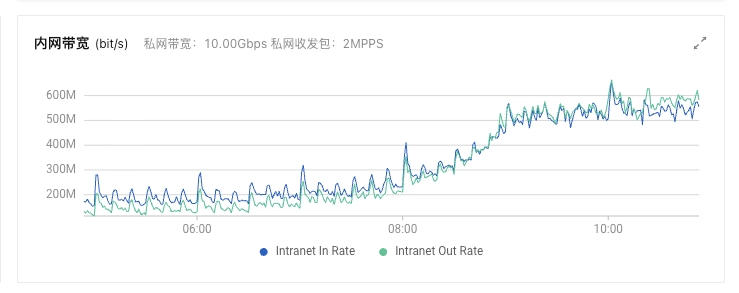
The Alibaba Cloud graphs told us the NIC was not saturated at that point (inbound + outbound reached only about 10% of the threshold). Now the graphs from the evening of the 23rd:
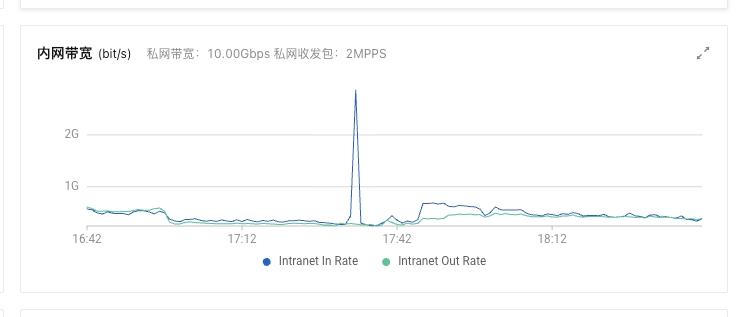
Note here: on Alibaba Cloud, the NIC does have a threshold, but short bursts past the limit are allowed (although in this case it was not saturated anyway).
If the network is not the problem, where is it?
Let’s try something else: pick a window when a node was being repeatedly added and removed, and run a packet capture on the master (193).
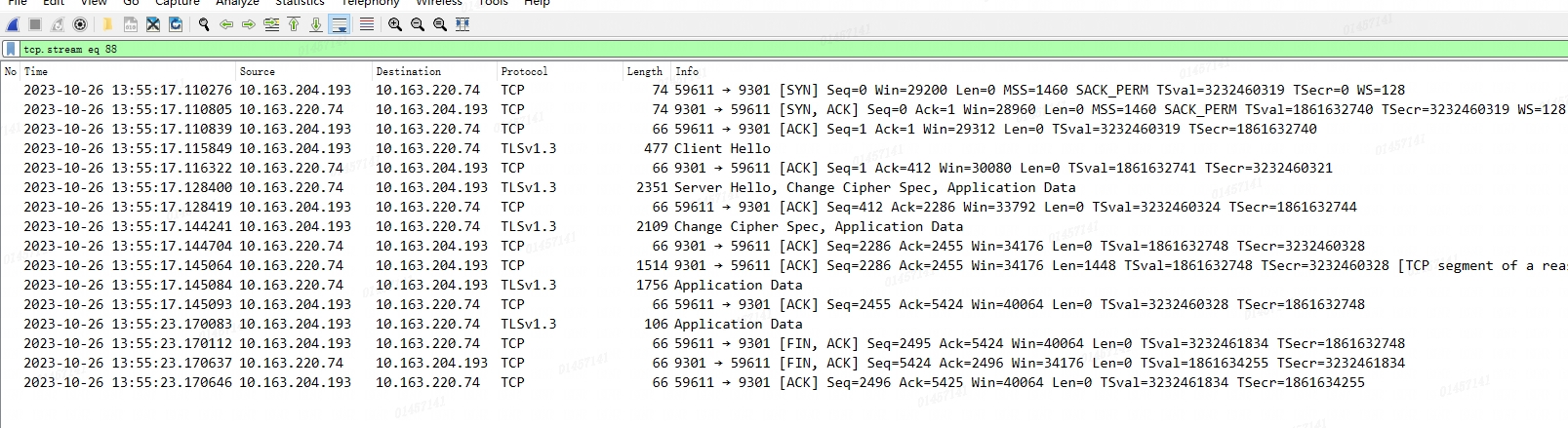
The capture showed:
- The network connections were fine: connection established — data sent — connection closed
- The master node was the one actively closing the connections
But why the master closed them was still unclear. Having traced it this far, we concluded the problem was not in the network but somewhere inside Elasticsearch itself.
More searching around turned up this issue: https://github.com/elastic/elasticsearch/issues/67873
The exact exceptions vary, but the symptom is the same:
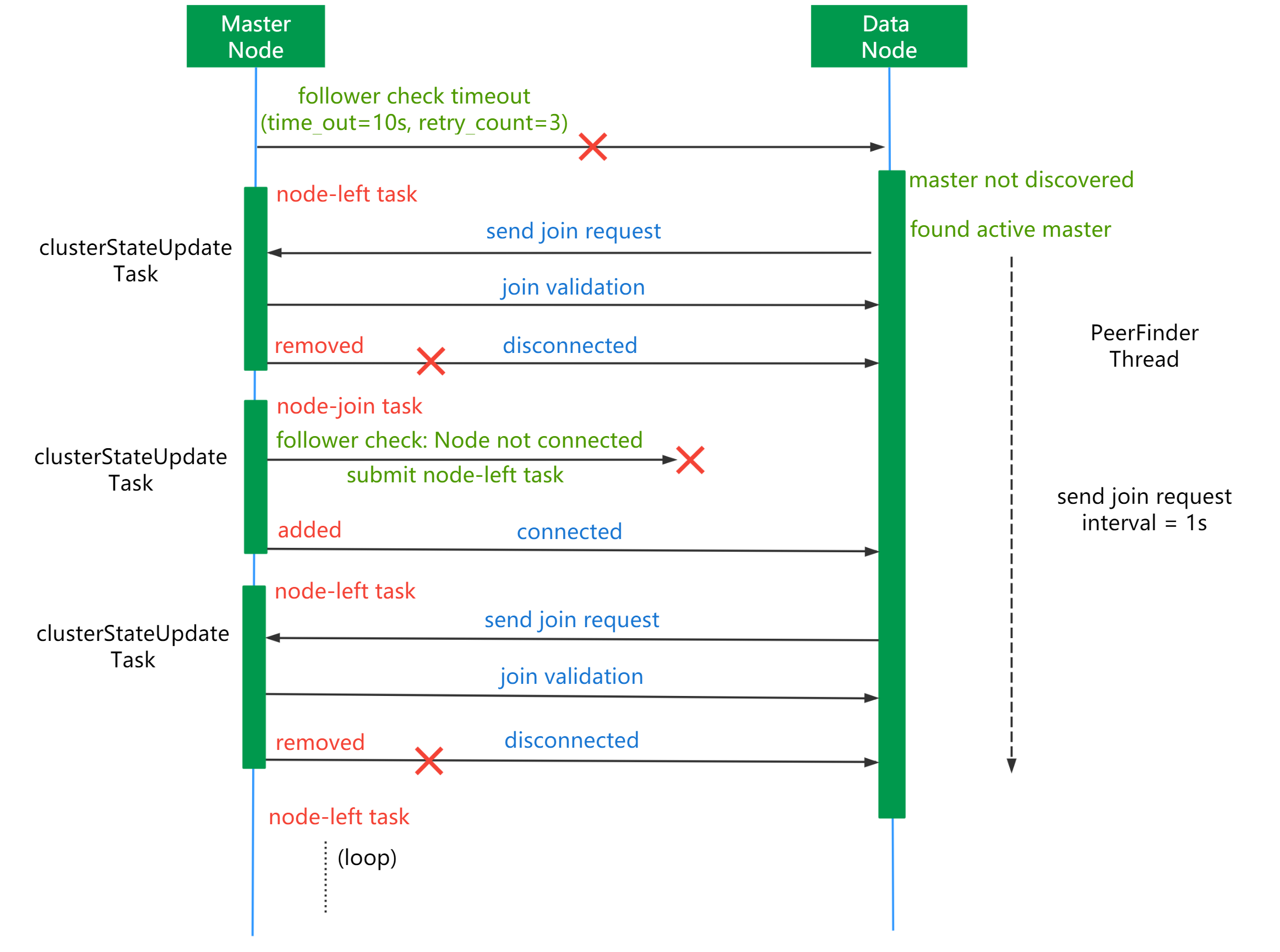
The issue pointed out that having too many shards harms the cluster in various ways.
We went back and looked at the cluster’s shard monitoring:
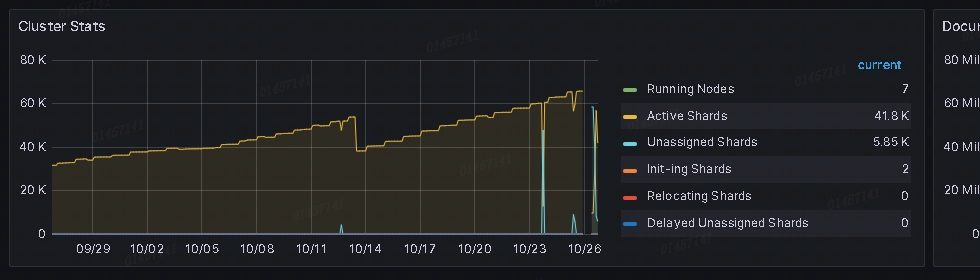
The shard count had been climbing the whole time — the cluster had reached 60,000+. Should we delete some historical indices and try?
At this point node 74 was being added and removed constantly. I manually restarted node 74 and tried deleting the July and August indices; the cluster gradually recovered to 70%+ — and then another node went offline.
We then deleted September’s indices plus October 1–6, and this time the cluster recovered (its shard count had by then dropped from 60,000 to 40,000).
The incident was contained. Over the following observation period we saw no more node-left events, but the root cause was never found. (For example, after the restart on the 23rd the shard count was also close to 60,000, yet that restart succeeded, while on the 25th recovery never completed.)
If you have material or best practices on this, please leave a comment.
Takeaways
The biggest thing I took away from this: the official recommendations are worth paying attention to.
How many shards should I have in an Elasticsearch cluster?
The official guidance (for 7.x):
1 | Aim for 20 shards or fewer per GB of heap memory |
Honestly, the main reason was cost control: as long as the cluster did not break, our general attitude toward the official advice looked like this:

We never took their advice on shard size, nor on the recommended data volume per node. Case in point: during this investigation, why did we never suspect that 30 TB was too much data? Because it used to be 40 TB+.

A few more points worth sharing after this incident:
- Different clusters should be resource-isolated — in other words, don’t co-locate them on the same machines
- Don’t run at the very edge of your limits
- Our ES disks were effectively always the bottleneck: whenever shard rebalancing kicked in, disk I/O was saturated, which dragged down write throughput and caused all sorts of other problems
- Nodes serving the same role in a cluster must have identical specs. In our ES cluster the disks were of different sizes, so once the disk watermark was hit, the cluster’s load became unbalanced
Estimating memory usage per the 8.3+ formula
Number of indices: 4300
Number of shards: 60000
Total mapping fields: 230000
60000*(230000/4300)*1kb=3209302 KB =3GB of heap space
This article is the English edition of a post originally published in Chinese.