Flood of TIME_WAIT Connections from a Go HTTP Client: Unread Response Bodies and the Liveness Probe

Notes from tuning TIME_WAIT connections in a Go HTTP Client.

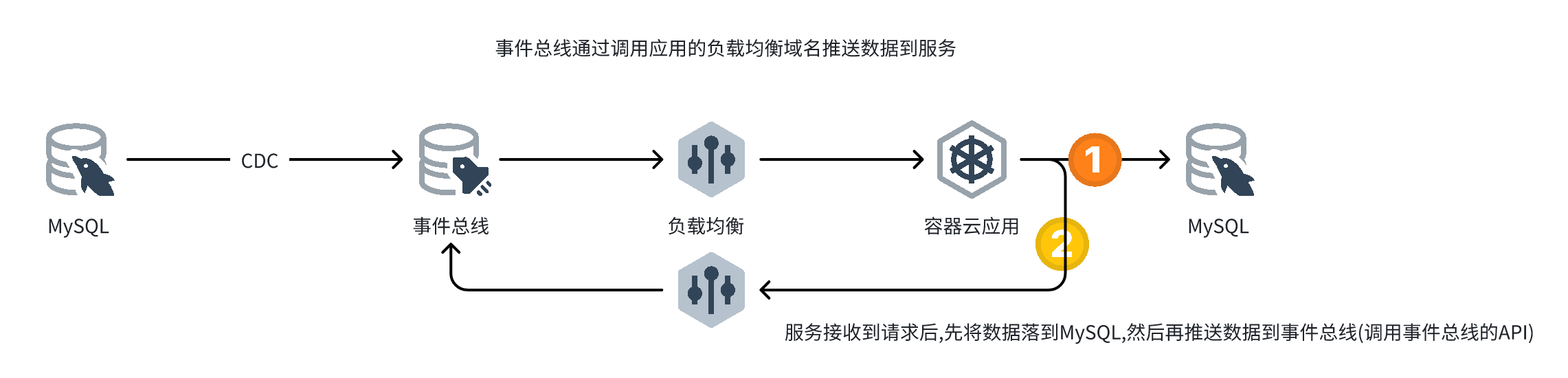
Business flow

业务流程

Analysis

Container monitoring showed a large number of short-lived connections between the service and the load balancer in front of the event bus. Time to go back to the code.

The code that sends the request:

1
2
3
4
5
6
7
8
9
10
11
12
13
14
15
16
17
18
19
20
21
22
23
24
25
26
27
28
29
30
31
32
33
34
35
36
37
38
39
40
41
func SendToKEvent(ev *KEvent) error {
data, err := json.Marshal(ev.Data)
if err != nil {
return err
}
log.Println(string(data))
if !sendEvent {
log.Println("------ SEND_EVENT IS DISABLED ------")
return nil
}

defer util.TimeCost("SendToKEvent")()

body := bytes.NewReader(data)
ctx, cancel := context.WithTimeout(context.Background(), 2*time.Second)
defer cancel()
req, err := http.NewRequest(http.MethodPost, ev.Url, body)
if err != nil {
return err
}
req.WithContext(ctx)
req.Header.Set("Content-Type", "application/json; charset=utf-8")
req.Header.Set("......", "......")

for k, v := range ev.ExtMap {
req.Header.Set(k, v)
}

resp, err := httpc.HttpClient.Do(req)
if err != nil {
return err
}
defer resp.Body.Close()

// the event bus treats any 2xx as success
if resp.StatusCode >= 300 || resp.StatusCode < 200 {
return fmt.Errorf("req failed, resp=%v", resp)
}

return nil
}

The HTTP client code:

1
2
3
4
5
6
7
8
9
10
11
12
13
14
15
16
17
18
19
20
var (
HttpClient = &http.Client{
Transport: &http.Transport{
Proxy: http.ProxyFromEnvironment,
DialContext: func(ctx context.Context, network, addr string) (conn net.Conn, e error) {
return (&net.Dialer{
Timeout: 10 * time.Second,
KeepAlive: 90 * time.Second,
}).DialContext(ctx, network, addr)
},
ForceAttemptHTTP2: true,
TLSHandshakeTimeout: 5 * time.Second,
ResponseHeaderTimeout: 30 * time.Second,
MaxIdleConnsPerHost: 10,
IdleConnTimeout: 90 * time.Second,
ExpectContinueTimeout: 1 * time.Second,
},
}
)

The code looked fine at first glance, but it reminded me of a problem I had handled before with the Go Elasticsearch client:

https://jiankunking.com/tcp-state-diagram.html

Looking at the TIME_WAIT section of that post, it turned out to be exactly this issue:
https://pkg.go.dev/net/http#Response

1
2
3
4
5
6
// The http Client and Transport guarantee that Body is always
// non-nil, even on responses without a body or responses with
// a zero-length body. It is the caller's responsibility to
// close Body. The default HTTP client's Transport may not
// reuse HTTP/1.x "keep-alive" TCP connections if the Body is
// not read to completion and closed.

Fixing the code:

1
2
3
4
5
6
7
8
9
10
11
func SendToKEvent(ev *KEvent) error {
......
resp, err := httpc.HttpClient.Do(req)
if err != nil {
return err
}
defer resp.Body.Close()
io.Copy(ioutil.Discard, resp.Body) // <-- add this line
......
return nil
}

After redeploying, the number of TIME_WAIT connections dropped a lot, but a dozen or so were still there:

1
2
3
4
5
6
7
8
9
10
11
12
13
14
15
bash-5.0# netstat -anp |grep TIME
tcp 0 0 ::ffff:172.16.3.247:8080 ::ffff:10.200.76.64:10964 TIME_WAIT -
tcp 0 0 ::ffff:172.16.3.247:8080 ::ffff:10.200.76.64:45738 TIME_WAIT -
tcp 0 0 ::ffff:172.16.3.247:8080 ::ffff:10.200.76.64:21178 TIME_WAIT -
tcp 0 0 ::ffff:172.16.3.247:8080 ::ffff:10.200.76.64:37354 TIME_WAIT -
tcp 0 0 ::ffff:172.16.3.247:8080 ::ffff:10.200.76.64:10966 TIME_WAIT -
tcp 0 0 ::ffff:172.16.3.247:8080 ::ffff:10.200.76.64:37352 TIME_WAIT -
tcp 0 0 ::ffff:172.16.3.247:8080 ::ffff:10.200.76.64:61524 TIME_WAIT -
tcp 0 0 ::ffff:172.16.3.247:8080 ::ffff:10.200.76.64:61526 TIME_WAIT -
tcp 0 0 ::ffff:172.16.3.247:8080 ::ffff:10.200.76.64:21180 TIME_WAIT -
tcp 0 0 ::ffff:172.16.3.247:8080 ::ffff:10.200.76.64:33256 TIME_WAIT -
tcp 0 0 ::ffff:172.16.3.247:8080 ::ffff:10.200.76.64:45736 TIME_WAIT -
tcp 0 0 ::ffff:172.16.3.247:8080 ::ffff:10.200.76.64:33254 TIME_WAIT -
bash-5.0#

A couple of things to note here:

  • 172.16.3.247 is the pod’s IP
  • 10.200.76.64 is the IP of the host machine the pod runs on

So there were short-lived connections between the pod and its host. What were those connections doing? Time for a packet capture:

网络连接分析

Look closely at frame No. 502:

1
2
3
4
5
6
7
8
9
10
11
12
13
Frame 502: 177 bytes on wire (1416 bits), 177 bytes captured (1416 bits)
Ethernet II, Src: ee:ee:ee:ee:ee:ee (ee:ee:ee:ee:ee:ee), Dst: b6:cd:6a:f8:69:5e (b6:cd:6a:f8:69:5e)
Internet Protocol Version 4, Src: 10.200.76.64, Dst: 172.16.3.247
Transmission Control Protocol, Src Port: 29978, Dst Port: 8080, Seq: 1, Ack: 1, Len: 111
Hypertext Transfer Protocol
GET /healthz HTTP/1.1\r\n <-- note this line: this is the service's configured liveness probe endpoint
Host: 172.16.3.247:8080\r\n
User-Agent: kube-probe/1.21\r\n
Accept: */*\r\n
Connection: close\r\n <-- note this line
\r\n
[Response in frame: 506]
[Full request URI: http://172.16.3.247:8080/healthz]

The Connection header:

  • Connection: keep-alive — once a page has loaded, the TCP connection used to transfer HTTP data between client and server stays open. If the client hits the same server again, it reuses the connection that is already established.
  • Connection: close — once a request completes, the TCP connection between client and server is closed. The next request from the client has to establish a new TCP connection.

The note on the Connection line says it all: a request carrying Connection: close will be a short-lived connection.

Now let’s look at the service’s Deployment configuration:

1
2
3
4
5
6
7
8
9
livenessProbe:
failureThreshold: 3
httpGet:
path: /healthz
port: 8080
scheme: HTTP
periodSeconds: 10
successThreshold: 1
timeoutSeconds: 1

At this point everything adds up: Kubernetes requests the service’s liveness endpoint every 10 seconds, each request is a short-lived connection, and the default TIME_WAIT duration is 120s.

So the service should hover at around 11–13 TIME_WAIT connections at all times.

With that, every remaining question was explained.

Conclusions

  • After a Go HTTP client request completes, even if the calling code does not use the response body, you still have to read the body.
  • As long as a service has a liveness probe configured, there will be short-lived connections; their number depends on the probe interval.

Further reading

This article is the English edition of a post originally published in Chinese.